
Satisfying Toys : Calm Games
Koko ZoneCasual
4.8160.00 Reviews
- Version
- 0.12.0
- Installs
- 10.00M
- Age Rating
- Everyone
Screenshots
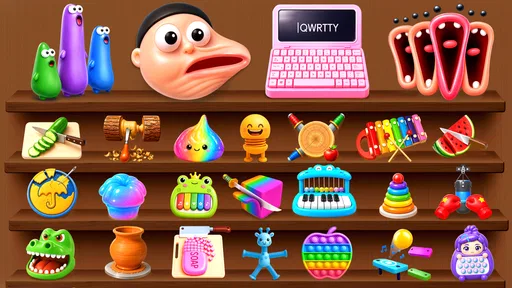

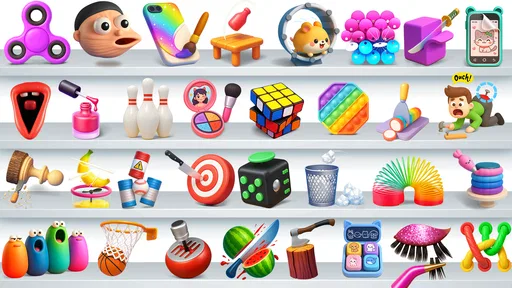
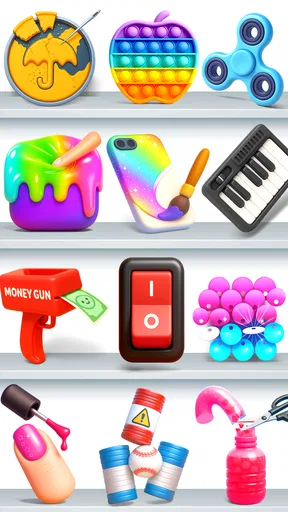


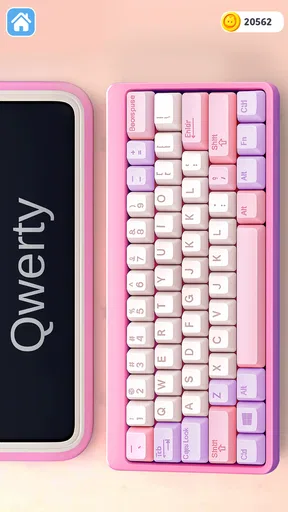

Our Review of Satisfying Toys : Calm Games
 Analysis by Appyee
I spend a lot of time testing casual games that promise a quick mental break, and Satisfying Toys: Calm Games is aimed squarely at that small space between boredom and overload. Developed by Koko Zone, this free Android game gathers simple calming activities under one roof, with relaxing sounds intended to make short sessions feel less demanding than a typical game. My first impression is that it works best as a tiny reset button rather than something I would play for long, competitive sessions.
That distinction matters. I would recommend it to someone who wants a few quiet minutes while waiting for an appointment, winding down after work, or taking a break from a busy day. I would not recommend it as a substitute for a deeper puzzle game, a structured mindfulness course, or anything built around long-term progression. Its appeal comes from immediacy: open it, choose something that feels pleasant, interact for a while, and leave when your attention has settled.
How the game handles readability and navigation
The casual format gives the game an important advantage for people who do not want to learn complicated rules. The store name, “Satisfying Toys,” sets the expectation clearly: this is about direct interaction and sensory feedback, not mastering a large system. I found that useful because I could approach a session without first studying instructions, character abilities, maps, or a demanding objective.
The presentation also seems better suited to short bursts than to extended reading. A player looking for a calm activity generally does not want a wall of text before the relaxing part begins. In that respect, the compact toy-like approach is sensible. It reduces the mental work required to get started and makes the game approachable for people who may be tired, distracted, or unfamiliar with mobile games.
Still, simple does not automatically mean accessible to everyone. A calm game can become frustrating if its controls, labels, or visual cues are difficult to interpret. When I review an app in this category, I pay attention to whether the player can understand what to do without guessing and whether moving between activities feels natural. Satisfying Toys: Calm Games benefits from its uncomplicated premise, but people who need large text, strong contrast, spoken guidance, or highly explicit instructions should judge the actual display on their device rather than assume that a minimal interface will meet those needs.
One practical tip is to use the game when your phone is already set up for comfortable viewing. Increasing system text size, reducing glare, and holding the device at a stable angle can make a bigger difference here than choosing the “right” activity. Those adjustments are especially useful for a player with limited vision or one who becomes tired by concentrating on small touch targets.
The game has reached a substantial audience, with more than ten million installs and an average rating of 4.6 from roughly twenty-six thousand ratings. That does not prove that every player will find the interface comfortable, but it does suggest that the basic concept is easy for many people to pick up. I would treat the rating as a sign of broad appeal, not as a guarantee of universal usability.
What the low-pressure design gets right
For me, the strongest navigation benefit is the absence of a heavy commitment. I can open the game without deciding whether I have enough time to finish a level or protect a streak. That is valuable for users whose attention comes and goes, including people taking short breaks between tasks. A game that lets me stop without penalty is more practical during a commute, a lunch break, or a moment when I am waiting for a call.
It is also a good fit for someone introducing a child or an older relative to casual mobile play, provided a trusted adult first checks the controls and sound level. The Everyone age rating supports the idea that the content is intended for a broad audience. Even so, age suitability and ability suitability are not the same thing. A child who can understand the activity may still struggle with touch precision, while an older player may enjoy the concept but need more visual clarity than the phone provides.
Motor control, sound, and sensory comfort
The central promise of this game is sensory rather than strategic. Its relaxing sounds and toy-like interactions are meant to make the act of playing feel soothing. I see that as a real strength for users who enjoy gentle feedback and repetitive actions. A few minutes of predictable interaction can be easier to tolerate than a game full of alarms, timers, enemies, or sudden failure screens.
There is a trade-off, though: sensory comfort is personal. Sounds that calm one player may distract or irritate another, particularly someone sensitive to repetitive audio, sharp effects, or layered stimulation. I would begin with the device volume low and adjust gradually. Headphones may help in a noisy room, but they can also make the sound feel more intense, so speakers at a modest level may be the better option for a sensitive listener.
People with limited fine-motor control should approach the game activity by activity. A casual label does not tell me whether every interaction requires the same amount of tapping, dragging, pressing, or timing. Some simple touch actions may be comfortable, while others could become tiring if they demand repeated precision. The most useful way to test it is to play for a minute with the hand you normally use, then notice whether the motion feels relaxed or whether you are gripping the phone and correcting your finger position constantly.
That leads to a less obvious recommendation: use a stand or rest the phone on a table during longer sessions. Holding a device in midair can turn a relaxing game into a hand and wrist exercise. A stable position also helps players who have tremors, reduced grip strength, or difficulty coordinating a touch gesture. This is not a special feature of the game, but it is a realistic way to make its intended low-stress experience more attainable.
Another useful habit is to separate “calming” from “sedating.” If I play immediately before sleep, the screen itself may keep me alert even when the sounds are gentle. For a bedtime routine, I would keep the session brief, lower the display brightness, and stop rather than continuing through every available activity. Someone who is especially sensitive to screen light may find an audio-only relaxation tool more suitable.
Who may enjoy the sensory approach
I think the game is most comfortable for people who like tactile-style digital toys but do not want a score-driven challenge. It may also suit a user who needs a predictable diversion during a stressful transition, such as waiting in a crowded place or taking a pause after a difficult conversation. The lack of competitive pressure can make it less intimidating than arcade games, while the short-session format avoids asking for a large block of concentration.
It is less suitable for anyone who finds repetitive interaction boring, needs a clear sense of achievement, or prefers calm experiences without sound and animation. Players with photosensitivity or strong sensory sensitivities should be cautious with any visually active game and stop if the presentation feels uncomfortable. I would also avoid assuming that a “relaxing” label makes the product appropriate during every kind of distress; a person in serious emotional difficulty may need human support or a professional resource instead of a casual app.
Using it in different places and routines
Satisfying Toys: Calm Games makes the most sense when I treat it as an on-demand activity rather than a daily program. Imagine finishing a series of demanding tasks at work and having seven minutes before the next meeting. A conventional game may pull me into a longer session, while this one gives me something small to do with my hands. I can choose a gentle interaction, keep the sound low enough not to disturb colleagues, and close it when the break ends.
That same scenario reveals an important limitation: the game is still a phone-based experience. In a shared office, classroom, library, or waiting room, sound may need to be muted or kept very quiet. If the calming effect depends heavily on audio, the experience may be weaker in those settings. Playing in a moving car is also a poor idea for anyone prone to motion sickness, and using it while walking creates an obvious safety problem.
For travel, I would use it as a short distraction rather than rely on it as my only offline entertainment. A user who expects a long flight or a place with unreliable connectivity should test the game in the intended situation beforehand. That simple check prevents disappointment and also gives the player a chance to see whether the controls remain comfortable when sitting in an awkward position.
It can work well as a shared, low-pressure activity too, especially when one person wants to demonstrate a toy-like interaction to another. However, the game is not automatically a multiplayer experience just because two people can watch one phone. If the goal is social conversation, a physical fidget object or a cooperative board game may be more natural. I would use this title as a conversation starter or personal diversion, not as the centerpiece of a group gathering.
The free price makes experimentation easy, but in-app purchases range from $0.99 to $9.99 per item. I would set a spending boundary before handing the device to a child or someone who may tap through purchase prompts without fully understanding them. The free entry point is helpful, yet the presence of optional purchases means “free” should be interpreted as free to start, not as a promise that every part of the experience has no cost.
When another type of app is the better choice
If I want measurable progress, a traditional puzzle game is likely a better fit. Puzzle titles usually give me goals, increasing difficulty, and a reason to return beyond the immediate sensation. If I want guided breathing, reflection, or a planned relaxation routine, a dedicated mindfulness app should offer clearer structure. If I need physical sensory input, a real fidget toy does not depend on battery life, screen brightness, or touch accuracy.
Where this game wins is convenience. It combines several small calming diversions in a single casual package, so I do not need to search for a new activity every time I have a spare moment. That convenience is particularly useful for someone who wants a quick option but does not want a subscription-based wellness program or a demanding game with a long tutorial.
Remaining barriers I would consider before installing
The biggest barrier is that “calm” is not a universal response. Some players will relax through repetition; others will feel under-stimulated or impatient. Without a strong goal structure, the experience may seem shallow after the novelty fades. I would not install it expecting a story, a deep progression system, or a substantial challenge.
Another barrier is the gap between broad age suitability and individual support needs. The Everyone rating tells me the content is broadly appropriate, but it does not answer questions about contrast, text scaling, audio alternatives, one-handed use, or gesture complexity. A person with accessibility requirements should test the first session carefully and keep the option of returning to a better-supported app.
Touchscreen fatigue is easy to overlook. Repeated tapping or dragging can aggravate discomfort even when the activity itself feels pleasant. I recommend using a timer for the first few sessions, not because the game imposes one, but because a relaxing loop can make me play longer than intended. Short pauses also make it easier to identify which interactions are comfortable and which are not.
There is a practical device consideration as well. The game requires Android 7.0 or later, so users with older phones should check compatibility before planning around it. The current version is 0.10.4, which makes it sensible to keep expectations realistic: an app can change its interface or behavior as it develops, and a player who depends on a familiar workflow may want to note what works for them after an update.
I also would not use it as a replacement for accessibility tools built into the phone. Screen readers, magnification, switch access, captions, and other system features can be essential for some users, but a game may not respond equally well to every setting. The safest approach is to enable only the tools that help, try one activity at a time, and stop if navigation becomes more effortful than the relaxation is worth.
My inclusive verdict on the experience
After looking at it as both a casual game and a calming tool, I see Satisfying Toys: Calm Games as a friendly, low-commitment option with a clear audience. Koko Zone has chosen an approachable format: short digital toys, gentle audio, and no need to become a serious gamer before getting started. The game is free, suitable for Everyone, and available on supported Android devices, which lowers the barrier for casual experimentation.
My recommendation is strongest for users who enjoy simple sensory interaction, want a quiet break, and can comfortably use ordinary touchscreen controls. I would suggest starting with the sound low, playing from a stable surface, and checking whether the visual and touch demands feel easy rather than assuming that a relaxing theme guarantees comfort. Those small choices make the review experience more honest and more useful for different abilities.
I would skip it if I needed robust accessibility options, a planned therapeutic routine, rich progression, or a fully passive way to relax. In those situations, a dedicated accessibility-focused app, a guided wellness tool, a physical object, or a deeper puzzle game may serve the purpose better. The in-app purchase range also deserves attention in family settings, even though the game costs nothing to begin.
For my own use, the deciding question is simple: do I want to accomplish something, or do I want to settle my attention for a few minutes? When the answer is the second one, this game has a reasonable place on my phone. Its best feature is the freedom to take a small break without turning that break into a commitment. That will not make it right for every player, but for the people who enjoy gentle digital toys and can use its touch and sound design comfortably, it is an easy casual game to try.
Privacy and Permissions
See what permissions an app requests and how it handles your data.
- Microphone
- record audio
- Wi-Fi connection information
- view Wi-Fi connections
- Other
- view network connections, pair with Bluetooth devices, full network access, control vibration, prevent device from sleeping, Google Play license check
Verdict
Strengths of Satisfying Toys : Calm Games
- Simple one-touch controls make the mini-games easy to pick up.
- Soft colors and smooth animations create a relaxing visual style.
- Short activities fit well into quick breaks or bedtime play.
- The variety of tactile tasks helps prevent the experience feeling repetitive.
- Works well for casual players who prefer low-pressure entertainment.
Limitations of Satisfying Toys : Calm Games
- Some mini-games may feel too basic for players seeking deeper challenges.
- Repetition can become noticeable after extended play sessions.
- Certain content or features may depend on ads or in-app purchases.
- The calming design may feel slow to users who prefer fast-paced games.
- Its appeal is mainly sensory, with limited progression or long-term goals.
Similar Picks in This Category
View All
My Talking Angela
Outfit7 Limited4.2

My Talking Tom
Outfit7 Limited4.3

Pou
Zakeh4.2

My Talking Tom 2: Pet Game
Outfit7 Limited4.3

Candy Crush Saga
King4.6

Bridge Race
Supersonic Studios LTD4.1
Frequently Asked Questions
What is Satisfying Toys: Calm Games?
Satisfying Toys: Calm Games is a relaxing mobile game collection built around simple, tactile activities and satisfying interactions. Instead of focusing on competition or difficult objectives, it offers short calming challenges involving virtual toys, textures, movements, and visual effects. It is designed for casual play when you want to unwind, pass time, or enjoy repetitive actions without pressure.
Is Satisfying Toys: Calm Games suitable for children?
The game is generally easy to understand because its activities rely on simple touch controls rather than complicated rules. Children may enjoy the colorful toys and straightforward interactions, while adults can use it as a casual relaxation experience. However, parents should review the app’s age rating, advertising, and in-app purchase settings before allowing younger children to play unsupervised.
Does the game require an internet connection?
Some features of Satisfying Toys: Calm Games may work without a constant internet connection, which makes it convenient for short offline sessions. Nevertheless, advertisements, updates, analytics, or certain downloadable content may require connectivity. Availability can also vary between versions, so it is best to launch the game once online and check which activities remain accessible when airplane mode is enabled.
Is Satisfying Toys: Calm Games free to download and play?
The game can generally be downloaded without an upfront purchase, but free access may be supported by advertisements and optional in-app purchases. Depending on the version, purchases could remove ads or unlock additional toys, activities, or content. Before confirming any transaction, check the store listing and the payment settings on your Android or iOS device.
Is Satisfying Toys: Calm Games actually relaxing to play?
The relaxing effect depends on your personal preferences, but the game’s slow-paced interactions, repetitive actions, and colorful feedback are intended to create a calming experience. It is better suited to brief breaks than to deep meditation, since advertising or frequent prompts may interrupt the mood. Players looking for a quiet experience should adjust sound, notifications, and device settings.
Play our best games!


